1.teacher.py
#!/usr/bin/env python
import rospy
from std_msgs.msg import String

rospy.init_node('teacher')

pub = rospy.Publisher('my_topic', String)

rate = rospy.Rate(2)

while not rospy.is_shutdown():
    pub.publish('call me please')
    rate.sleep()
1) #!/usr/bin/env python
#! : sharp(#) + bang(!) 의 합성어로 Shebang 이라 부르며 해당 라인은 Shebang Line 이라한다. script가 시작하는 곳에 위치한다.
그 뒤의 절대경로는 인터프리터의 절대경로로 해당 파이썬 파일을 해석해준다.
#!/usr/bin/env + 언어 형식이 일반적인 Shebang의 사용방법이다.
#! 뒤에 경로가 정확하지 않으면 Command not found라는 에러가 나올 것이다.
Shebang 생략되면 아래와 같은 에러가 발생하여 코드 실행을 못한다
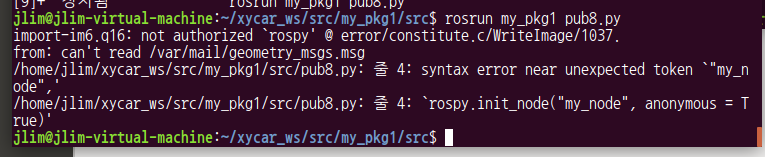
Shebang을 넣으니 다음과 같이 잘 실행된다

2) import rospy
2)-1 import rospy
ROS를 위한 파이썬 라이브러리이다.
해당 라이브러리는 ROS Topics, Services, Param 이 있는 인터페이스를 제공해준다.
python에서 노드를 작성할 때 rospy를 import해야한다
2)-2 from std_msgs.msg import String
std_msgs: 일반적인 메시지 타입들을 포함하는 표준 ROS 메시지 패키지이다. (http://wiki.ros.org/std_msgs)
해당 패키지에서 String 클래스를 load한다.
3) rospy.init_node('teacher')
teacher 노드 생성( Publisher가 될 대상)
4) pub = rospy.Publisher('my_topic', String)
rospy.Publisher 초기화
teacher 노드에서 , Subscriber에게 제공할 "my_topic" (String type)이라는 토픽을 발행한다
eg)
pub = rospy.Publisher('topic_name', std_msgs.msg.String, queue_size=10)topic name : topic_name
Message class: std_msgs.msg.String
queue_size 는 전송하려는 메시지의 사이즈이다. 사이즈는 설정가능하다. 4)처럼 사용하지 않을 수 있다. int형이다.
5) rate = rospy.Rate(2)
loop를 통해 데이터들을 읽어들일 때 정확한 시간을 정해 그 시간 내에 입력되는 데이터들을 reading 하게 해주는 메서드이다.
해당 예제에선 2가 인자값으로 있는데, 1Hz는 1초에 한번 반복 또는 진동(event)이 일어난다는 의미로 2를 설정했으니 1초에 2번 반복 또는 진동 (event) 가 일어난다.
6)에서의 rate.sleep()는 reading이 완료된 후 남은 시간을 채우기위함이다. 이는 정확성/신뢰성을 보장해준다.
5)과 6)은 하기 roboticsbackend.com 사이트 참조하면 유익한 정보를 얻을 수 있다.
ROS Rate is different from a “simple” sleep functionality, because it will dynamically choose the correct amount of time to sleep to respect the given frequency. [ https://roboticsbackend.com/ros-rate-roscpy-roscpp/ ]
5)에서 rate를 기본설정하였다.
6) while not rospy.is_shutdown(): // ctrl c를 누르지 않는 한 루프를 계속 돈다는 의미이다.
pub.publish('call me please') // call me please를 ~에게 보내는 함수이다.
rate.sleep() // 해당 함수를 보내고 설정됬던 1초에 2번의 이벤트가 끝날때까지 기다린다. 이벤트 끝나면 다음 루프를 진행한다.
2. student.py
#!/usr/bin/env python

import rospy
from std_msgs.msg import String

def callback(msg):
    print msg.data

rospy.init_node('student')

sub = rospy.Subscriber('my_topic', String, callback)

rospy.spin()
1) from std_msgs.msg import String
std_msgs: 일반적인 메시지 타입들을 포함하는 표준 ROS 메시지 패키지이다. (http://wiki.ros.org/std_msgs)
해당 패키지에서 String 클래스를 load한다.
2) def callback(msg):
call
2-1) print msg.data print: 파이썬 2.0버전에서의 print 함수 형식
student 구독자 노드가 전달받은 msg 클래스 변수 데이터 출력
3) rospy.init_node('student')
student 노드 생성
4) sub = rospy.Subscriber('my_topic', String, callback)
student 노드가 my_topic (String type) 을 구독한다고 선언한다. student 노드가 새 메시지들을 받을 때 콜백함수가 작동한다. (http://wiki.ros.org/ROS/Tutorials/WritingPublisherSubscriber%28python%29)
메시지 (event) 받을 때 동시에 2-1 이 진행된다.
5) rospy.spin()
shut down (ctl c ) 되지 않는한 subscriber 노드를 보존해준다는 의미이다. 그러면 메시지 event 받을 때마다 콜백함수를 호출하게 된다.
The final addition, rospy.spin() simply keeps your node from exiting until the node has been shutdown. Unlike roscpp, rospy.spin() does not affect the subscriber callback functions, as those have their own threads.
느낀점
해당 코드를 분석하면서 여러 사이트를 참조했지만, ROS 튜토리얼 은 정말 친절하다는 걸 느꼈습니다.
참조
http://wiki.ros.org/ROS/Tutorials/WritingPublisherSubscriber%28python%29
http://library.isr.ist.utl.pt/docs/roswiki/rospy(2f)Overview(2f)Publishers(20)and(20)Subscribers.html
'프로그래머스 > ROS' 카테고리의 다른 글
| ROS 노드통신 프로그래밍(2) (0) | 2022.11.08 |
|---|---|
| ROS 노드 통신 프로그래밍(1) (0) | 2022.11.08 |
| week2-2 8자주행 (과제1) (0) | 2022.11.08 |
| 2) ROS 설치 (0) | 2022.11.07 |
| 프로그래머스 ROS 기초 (0) | 2022.11.07 |